>_ Version 1.11, out now on Google Play

The minimal launcher for phones with real keys.

Keyboard Launcher Pro is a minimalist home screen with no app grid and nothing shouting for your attention. Start typing to open an app or find a person, or put a symbol first and it becomes a message, an event, a to-do or a note. Built for the Unihertz Titan 2 Elite.

Get it on Google Play

>_ Eight symbols

One line does everything

Put a symbol in front of what you type and it goes where it belongs. No app to open first, no form to fill in. See every command.

@

Message

@sarah running ten late

Picks the person, then the app you message them on.

#

Call

#mum

Rings them, choosing between their numbers if they have more than one.

*

Event

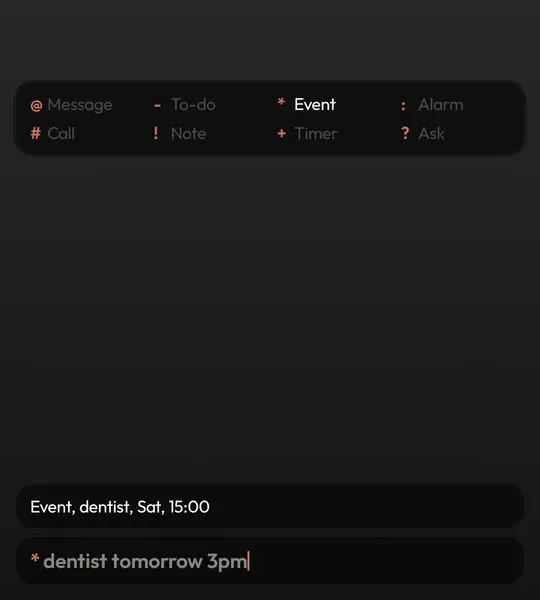
*dentist fri 9am

Lands in your real calendar, read in your own language.

-

To-do

-buy milk tomorrow

Goes on your to-do list with the time set.

!

Note

!ring the vet on tuesday

A note, saved before you have finished thinking it.

:

Alarm

:7am

Sets an alarm in the clock app you already use.

+

Timer

+45m

Starts a timer. +10 is ten minutes, +1h30 is ninety.

?

Ask

?why is the sky blue

Hands the question to the assistant you chose.

>_ Minimal, not limited

A minimalist launcher that still does the work

Most minimalist launchers make your phone calmer by taking things away, then leave you hunting for the app you actually need. Keyboard Launcher Pro takes the clutter away and puts the keyboard in its place. There is no grid of icons, no badges glowing on every corner and no colour except one accent for the thing that matters right now.

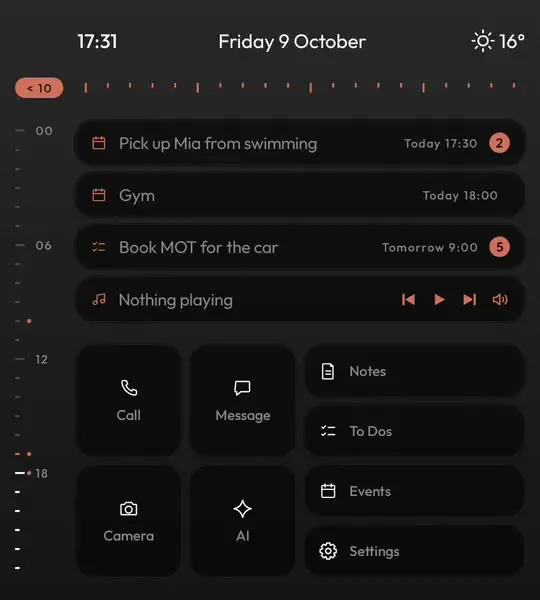
Everything is still a few letters away. Two letters open an app, a name finds a person, and a symbol at the start of a line sends it to your calendar, your to-do list or a chat. Your day sits on one quiet screen: the time, the weather, your next event and your next to-do, in grey text on dark.

It is a minimal launcher built for keyboard phones, where typing is faster than tapping, and it works on ordinary touchscreen phones as well. If you are after the calm of a dumbphone without losing your apps, it does that too.
No app grid. Just start typing.

There is no grid of icons to swipe through. From the home screen, type a few letters of an app or a person and the match is at the top. Press Enter and you are in.

Names are matched from the start of a word, so wa finds WhatsApp and not something with wa in the middle of it.

  • Apps and people in the same list
  • Search groups keep a pile of apps out of the way
  • Hide anyone from search without touching your contacts
New in 1.11

Every message, one swipe away

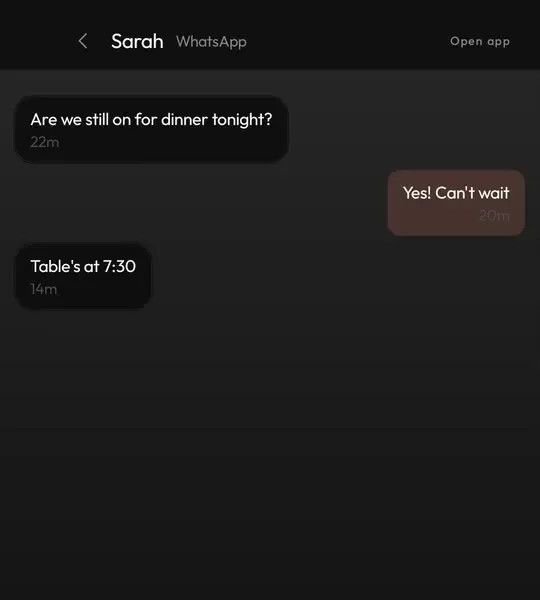
The Hub gathers your notifications on one screen, sorted into Messages, Email, Social and the rest. Tap a chat and it opens as a conversation you can reply to without leaving home.

Hold a card to flag it, clear it or hide that app from the Hub for good. It keeps its history after you dismiss things elsewhere.

  • Replies from the Hub itself
  • Search and filters
  • Music players never clutter it
New in 1.11

Your calendar, a month at a glance

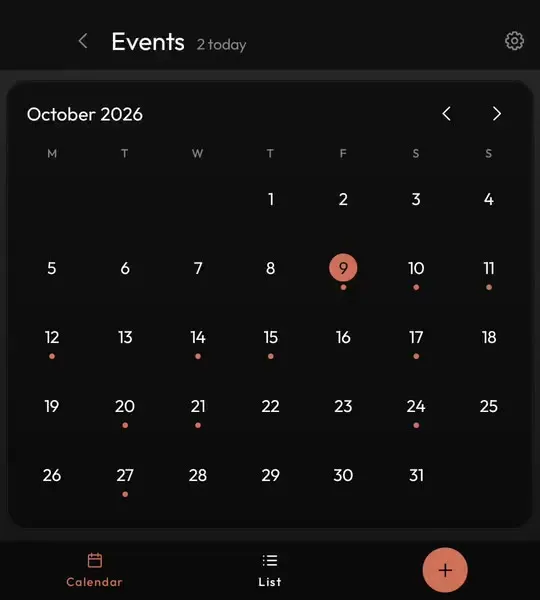
Events reads the calendars already on your phone, Google, Outlook or anything else that syncs, and shows a month you can tap through day by day, or a list of everything coming up.

Type * and a line like *lunch with Tom thursday 1pm and it is in your real calendar before you put the phone down.

  • Choose which calendars show
  • Choose where new events go
  • A proper new event page when you want one

Notes that start with !

Type ! and a thought on the home screen and it is saved as a note. Open Notes for the full editor, with bold, lists and checkboxes.

Private notes are encrypted on the phone and only open with your fingerprint or PIN.

  • Personal, work and private tabs
  • Pin the ones you need
  • Kept in your own encrypted backup

To-dos that start with -

A - in front of anything makes it a to-do, and a time in the line sets when it is due: -post the parcel tomorrow 10am.

Your next one sits on the home screen, so it is in front of you without opening anything.

  • Due times in your accent colour
  • Tick off from the list
  • Read in thirteen languages

A page of widgets, one swipe right

Any widget from any app goes on its own page beside home, sized how you want it. When you add one, you see exactly how it will look first.

Home stays clean, and the weather, your inbox or your photos are one swipe away.

  • Live previews in the picker
  • Resize by cells
  • Works with every app's widgets

Minimal by design, yours by choice

Light or dark, seven accent colours, nine typefaces and six backgrounds, or your own photo behind everything. Change one and the whole launcher follows.

  • Your photo darkened so text stays readable
  • Twelve or twenty four hour clock
  • Celsius or Fahrenheit
New in 1.11

Tiles that open anything

The tiles on home can open an app, a built-in screen, an app shortcut, a WhatsApp chat or a website you added from Chrome. Pick from eighty hand-drawn icons, or use your own picture.

Hold a letter on home and it can open any of those too.

  • Stock, Apps, Shortcuts and Icon tabs
  • Your own image as an icon
  • Twelve tiles on tall phones
New in 1.11

A clock you can set up your way

A large centred clock with the date and weather under it, in sizes from 80 to 120 per cent. Pick the date format, the brightness of the text and whether the clock takes your accent colour.

  • Three date formats
  • Weather from where you are
  • Next alarm at a glance

Never touch the glass

Turn on the cursor and the arrow keys walk the whole launcher: home, the Hub, notes, to-dos and events. Enter opens whatever the cursor is on.

It is off unless you want it, so a swipe across the keys still scrolls as it always has.

  • Arrow keys or a swipe across the keys
  • Every screen, every tab
  • Tap Alt or Shift for symbols on home

Every app, A to Z

Swipe up for the app drawer. The rail down the side jumps to a letter, and typing searches the list you are looking at.

  • Chinese names filed under their pinyin letter
  • Work profile apps included
  • Search the list as you type

>_ What it does not do

Yours, and nobody else's

No account

Nothing to sign up for and nothing to sign in to.

No cloud

No server and nothing uploaded. Backups are one encrypted file that you keep.

No ads or tracking

No analytics inside the app, ever.

No subscription

Pay once on Google Play and every update is free.

No texts or call log

It never asks to read them. The Hub works from your notifications.

Built by one person

Every update so far has been shaped by what buyers asked for.

>_ Works with

Made for keyboard phones

Every screen is drawn for a square display and a hardware keyboard, right down to the strip beside the camera that most launchers leave empty.

Screenshots of the minimal launcher

Keyboard Launcher Pro minimal home screen with the clock, weather, next events and tiles in grey text
A minimal home screen
Typing *dentist tomorrow 3pm on the home screen, with the event preview above it
Type an event in one line
A WhatsApp conversation with Sarah opened from the Keyboard Launcher Pro Hub
Chats open from the Hub
Keyboard Launcher Pro events app showing October as a month calendar
Your calendar by the month
Keyboard Launcher Pro app icon

Get Keyboard Launcher Pro

Pay once on Google Play. Free updates, no account, nothing uploaded.

Get it on Google Play

Questions

Is Keyboard Launcher Pro a minimal launcher?

Yes. Home has no app grid and no icon wall, just grey text on a dark screen with one accent colour. Unlike most minimalist launchers it is built around a keyboard, so everything you took off the screen is still a few keystrokes away.

Which phones does it work on?

It is built and tested on the Unihertz Titan 2 Elite and runs on the Titan 2, and it is made for keyboard phones like the Clicks Communicator and Zinwa Q25. It works on ordinary touchscreen phones as well, with twelve tiles on tall screens.

Where do I get it?

On the Google Play Store. You pay once and every update after that is free and installs automatically.

Is there a subscription?

No. You pay once. There are no ads, no in-app purchases and no account to make.

Does it send my data anywhere?

No. Your notes, to-dos, contacts, calendars and notifications are read on the phone and stay there. The only thing it fetches is the weather. The privacy policy has the detail.

What languages is it in?

English, German, French, Spanish, Italian, Dutch, Polish, Portuguese, Russian, Turkish, Japanese, Korean and Chinese, and typed dates like tomorrow 3pm are read in each of them.

Why does it ask for accessibility access?

Only for three optional things: the Screen off tile, the swipe down for your notifications and the quick settings panel. It reads nothing on your screen and the launcher works fully without it.

Can I go back to my old launcher?

Yes. Press home, choose your old launcher, and everything is as it was. Uninstalling removes it completely.

Where can I ask a question or suggest something?

Join the Discord or email me. A lot of every update comes from what buyers ask for.